> For the complete documentation index, see [llms.txt](https://documentation.kodiak.finance/llms.txt). Markdown versions of documentation pages are available by appending `.md` to page URLs; this page is available as [Markdown](https://documentation.kodiak.finance/user-guide/baults-auto-compound.md).
# Baults (Auto-Compound)
### Table of Contents
1. [Overview](#overview)
2. [Quick Start Guide](#quick-start-guide)
3. [User Interface Guide](#user-interface-guide)
4. [FAQ](#frequently-asked-questions)
***
### Overview
**Baults** are auto-compounding vaults for your LP tokens. Instead of manually claiming WBERA rewards and reinvesting them yourself, Baults handle this automatically.
Here's how it works: you deposit your LP tokens, and whenever WBERA rewards accumulate, the vault automatically claims and reinvests them back into your position.
#### Key Benefits
{% hint style="success" %}
**✨ Auto-Compounding** - Your WBERA rewards are automatically reinvested and compounded
**📈 Optimal Yield** - WBERA rewards are continuously auctioned to highest bidder
**🔒 Secure** - Built on battle-tested ERC-4626 vault standards
:heavy\_dollar\_sign: **Tokenized -** Bault shares are fully composable in DeFi (and can be stacked with Kodiak Farm)
{% endhint %}
***
### Quick Start Guide
### Find Baults
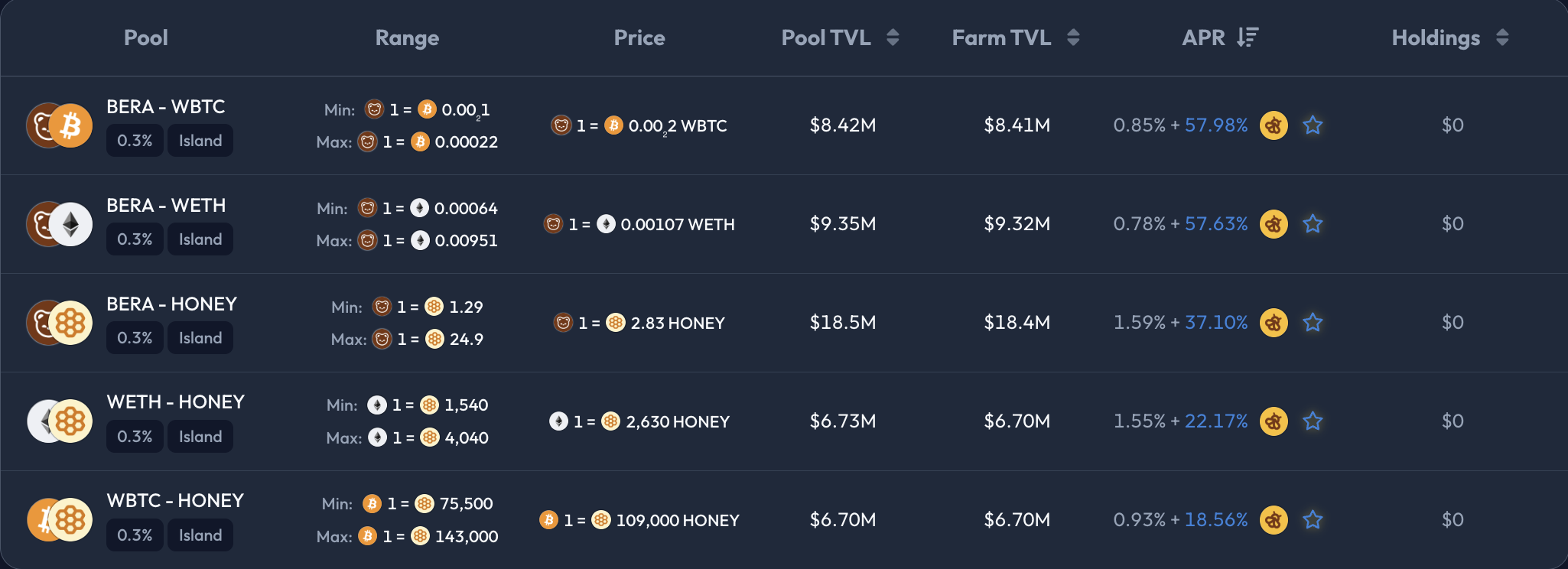
To see which pools support auto-compounding, enable the **Baults** filter
**Steps to find Baults:**
1. Check the **"Baults"** filter box
2. Browse the pool list for auto-compounding opportunities
### Identifying Auto-Compounding Pools
Pools eligible for Baults will show a **star icon** (🌟) in the APR column.
**Hover over the star** to see Bault details:
* "This pool is eligible for auto-compounding"
* Specific APY rate (e.g., "Earn 27.28% APY in Bault")
***
### User Interface Guide
### Depositing in Baults
There are several ways to get your tokens into auto-compounding Baults:
1. **Migration from Reward Vault**
If you already have positions staked in Reward Vaults, you'll see a migration prompt appear automatically.
#### When Migration Appears
The **"Migrate to Auto-Compound"** prompt automatically appears when:
✅ **You have positions in Reward Vaults** (manual staking)
**Example**: "You have $0.28 staked in the Reward Vault. Migrate to baults to automatically reinvest your rewards and maximize your yield."
#### 3-Step Migration Process
{% hint style="info" %}
Migration is a **3-step process** that ensures everything transfers correctly and safely.
{% endhint %}
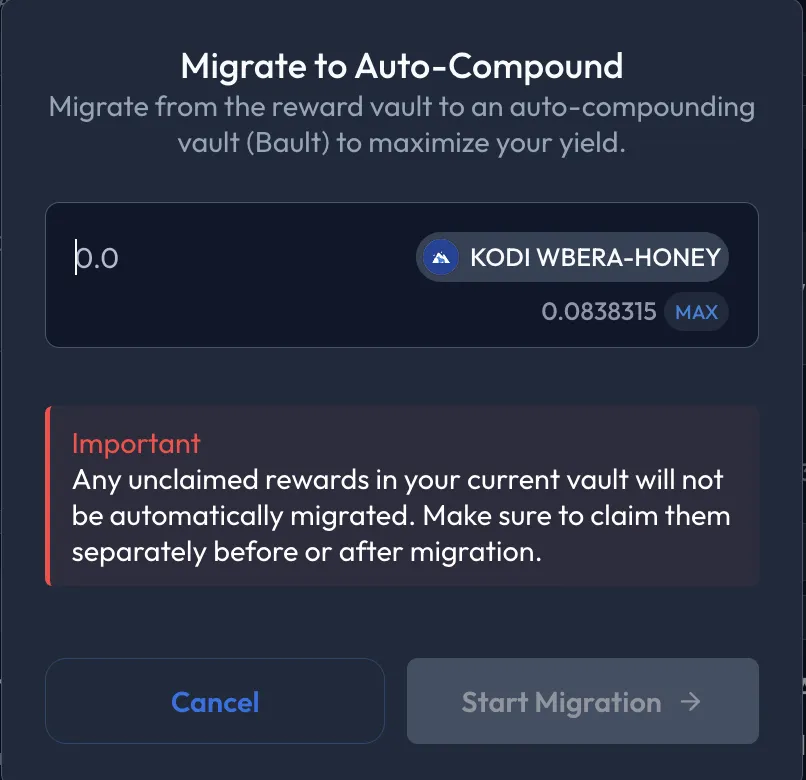
**Step 1: Review & Start Migration**
**Migration Setup Modal**:
* **Amount Selection**: Choose how much to migrate (can be partial)
* **Balance Check**: Shows available LP tokens in Reward Vault
* **Important Warning**: "Any unclaimed rewards in your current vault will not be automatically migrated. Make sure to claim them separately before or after migration."
**Example from Interface**:
* Available to migrate: 0.0838315 KODI WBERA-HONEY
* Current value: $0.28
* Buttons: "Cancel" or "Start Migration"
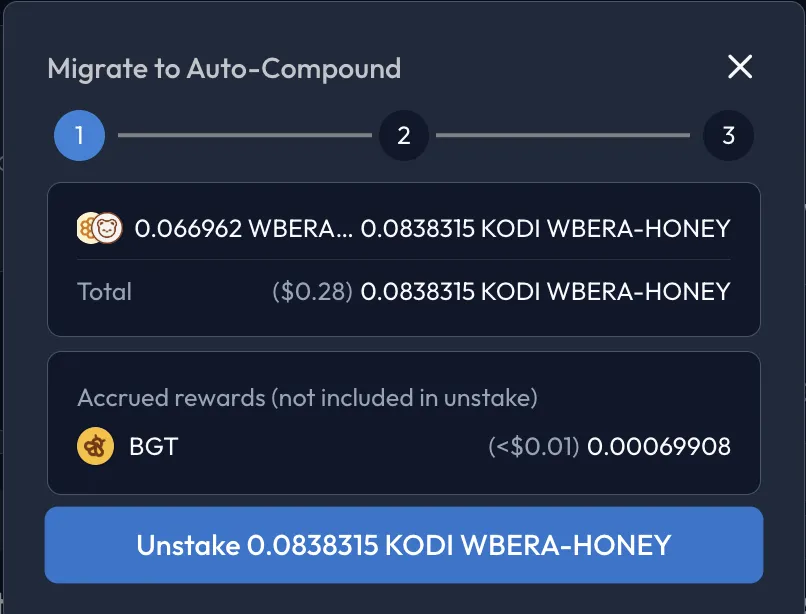
**Step 2: Unstake from Reward Vault**
**What Happens**:
* **Removes LP tokens** from Reward Vault
* **Shows breakdown** of what gets unstaked vs rewards that remain
* **Transaction required** to unstake your position
**Interface Details**:
* **Total Value**: ($0.28) 0.0838315 KODI WBERA-HONEY
* **Accrued Rewards**: WBERA (<$0.01) 0.00069908 (not included in unstake)
* **Action Button**: "Unstake 0.0838315 KODI WBERA-HONEY"
{% hint style="danger" %}
**Important**: WBERA rewards remain unclaimed and are **not automatically claimed**. You can claim them before or after migration.
{% endhint %}
**Step 3: Approve & Deposit to Bault**
**Final Step**:
* **Token Approval**: Allow Bault contract to use your LP tokens (if needed)
* **Deposit to Bault**: Move LP tokens into auto-compounding vault
* **Receive Bault Shares**: Get auto-compound vault tokens
**Interface Shows**:
* **Final Amount**: 0.0838315203... KODI WBERA-HONEY
* **Value**: $0.28
* **Action Button**: "Confirm Deposit"
**Result**: Your LP tokens are now in the auto-compounding Bault, earning higher yields through auto-compounding.
2. **Using the Deposit Tab**
You are able to deposit directly to baults using the **Deposit Tab,** all you have to do is turn on the "Auto-compound rewards" toggle
The below table explains how the deposit tab flow works with the toggle turned on/off
{% tabs %}
{% tab title="Auto-Compound Strategy (Recommended)" %}
**🔄 Auto-Compound: ON**
**Deposit Only Flow**:
```
Your Tokens → Island LP → Bault Shares
```
* ✅ Add liquidity to Island pool
* ✅ Automatically deposit LP tokens into Bault
* ✅ Start earning auto-compounded WBERA rewards
* ✅ Receive Bault shares (compound over time)
{% endtab %}
{% tab title="⏸️ Auto-Compound: OFF" %}
**Deposit Only Flow**:
```
Your Tokens → Island LP (in wallet)
```
* ✅ Add liquidity to Island pool only
* ✅ Receive Island LP tokens in your wallet
* ✅ Manual control over what to do next
* ✅ Can stake manually later via Stake tab
**With Staking Flow**:
```
Your Tokens → Island LP → BGT Reward Vault
```
* ✅ Add liquidity to Island pool
* ✅ Immediately stake LP tokens in BGT Reward Vault
* ✅ Earn BGT rewards (requires manual claiming)
* ✅ Direct WBERA rewards, no auto-compounding
{% endtab %}
{% endtabs %}
***
### 🎯 Stake Tab: Direct Staking
The **Stake Tab** is for users who already have lp tokens and want to stake them without adding new liquidity.
#### Real Example Walkthrough
**From the Interface:**
* **Available**: 0.24194 KODI WBERA-HONEY (Island LP tokens)
* **Strategy**: Auto-Compound ON
* **Expected**: \~0.2409 Bault-KODI WBERA-HONEY shares
* **APY**: 52.88% (with auto-compounding)
**What Happens:**
1. Stakes your 0.24194 Island LP tokens
2. Deposits them into Bault auto-compounding vault
3. You receive \~0.2409 Bault shares
4. Starts earning 52.88% APY through automated WBERA compounding
***
#### Unstake Tab
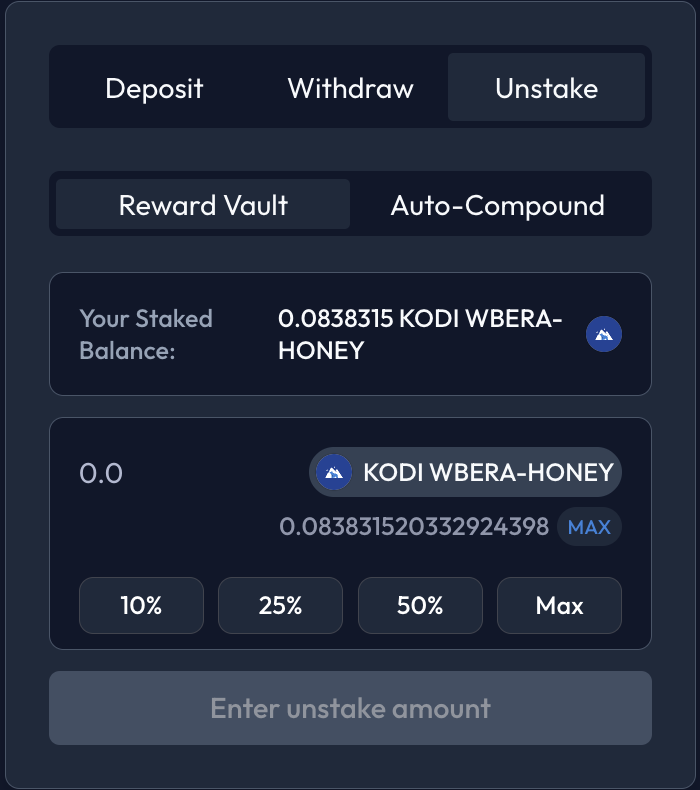
The **Unstake Tab** lets you remove tokens from staking positions without withdrawing liquidity entirely.
#### Smart Toggle System
**When you have multiple staking positions**, a toggle appears to choose which one to unstake:
Your Positions
Toggle Options
Reward Vault + Bault
"Reward Vault" | "Auto-Compound"
***
### ❓ Frequently Asked Questions
Which strategy should I choose as a beginner
**Recommendation**: Start with **Auto-Compound + Deposit Only**
**Why this is best for beginners**:
* ✅ Hands-off management (set and forget)
* ✅ Higher long-term returns than manual
💸 When should I withdraw vs unstake?
**Withdraw When**:
* You need the actual tokens for other purposes
* You're completely exiting
* You want to sell the underlying assets
**Unstake (Keep LP Position) When**:
* You want to change staking strategies (e.g. moving to an Infrared Vault)
* You're optimizing your current position
* You might restake differently later
* You want to keep LP exposure but change reward method
🔢 How is APY calculated?
APY is calculated by annualizing the share growth from the 10 most recent realized compounds.
⚡ How often does compounding happen?
You can see how often compound happens in the bault analytics section on the app, it shows detailed information about a specific baults
🎫 What are Bault shares?
**Bault Shares Explained**:
* **Representation**: Your proportional ownership of the vault
* **Growth**: Share value increases as rewards compound
* **Standard**: ERC-4626 vault token standard
* **Fungible**: Can be transferred like any ERC-20 token
**Example**: Start with 1 share worth 1 LP token. After compounding, 1 share might be worth 1.1 LP tokens.